
Connecting Android Apps to LLMs Using MCP Server Workflows: Complete Developer Guide (2026)
A complete guide to connecting Android applications to Large Language Models using Model Context Protocol (MCP) server workflows in 2026.


Table of Contents
What Is Model Context Protocol?
MCP is an open protocol that defines how AI models talk to external systems tools, resources, and environments in a structured, predictable way. Instead of each app reinventing function calling differently, MCP gives a standard way to describe tools (like open bluetooth settings, fetch user profile, query SQL), a standard way for clients (Android apps, web apps, desktop tools) to discover and call those tools.a standard way for LLMs to reason about those tools and chain them together. Think of MCP as the USB standard for AI tools where your MCP server is the device exposing capabilities and your Android app (via an MCP client) is the host that plugs into it.
Why MCP is matters in 2026?
In 2026, AI is no longer a fancy side-feature in Android apps - it is the core experience for many products, from personal finance apps to healthcare assistants and developer tools. Users are getting used to conversational interfaces that can understand local languages, work offline when possible and integrate with device capabilities like Bluetooth, contacts and sensors.
Directly wiring your Android app to an LLM API (like OpenAI, Anthropic, Gemini, etc.) quickly becomes a mess you end up hardcoding prompts, business logic gets mixed with network calls and each new feature becomes another brittle chain of API calls. Model Context Protocol (MCP) changes this game by giving you a clean, standardized way to connect AI models to tools, APIs and device actions without turning your Android codebase into spaghetti.
In this guide you’ll build a complete workflow:
- A Python MCP server using FastMCP.
- An Android Kotlin client communicating with it over HTTP.
- A practical example.
Why MCP Is Better Than Direct LLM API Calls?
You can absolutely call OpenAI or Anthropic directly from your Android app but MCP solves several hard problems. With MCP your Android app focuses on UI, UX, and user flows and your MCP server focuses on tools, business rules, and integration with services (databases, other APIs, device-specific bridges). This leads to Easier testing, Clearer responsibilities and faster onboarding for new developers. Most 2025–2026 LLM platforms now support MCP-based integrations, making your server usable across tools like IDE assistants, Desktop agents and Web dashboards that you build once; many clients can reuse the same MCP server. The MCP spec release candidate in 2026 focuses on stateless protocol core and extension mechanisms, which makes servers more portable and easier to adopt new LLM providers without rewriting everything. Instead of tightly coupling to one provider’s function-calling format, MCP lets you swap LLMs, Add observability and introduce multi-step workflows without changing the Android code. MCP encourages explicit tool definitions and permissions, making it easier to whitelist safe actions, audit what the AI is allowed to do, log tool usage for compliance. This matters a lot when your Android app deals with financial data, healthcare, or UPI-like flows. As an Android developer, think of MCP as the “backend contract” between your app and AI-powered workflows.
Architecture with Diagram
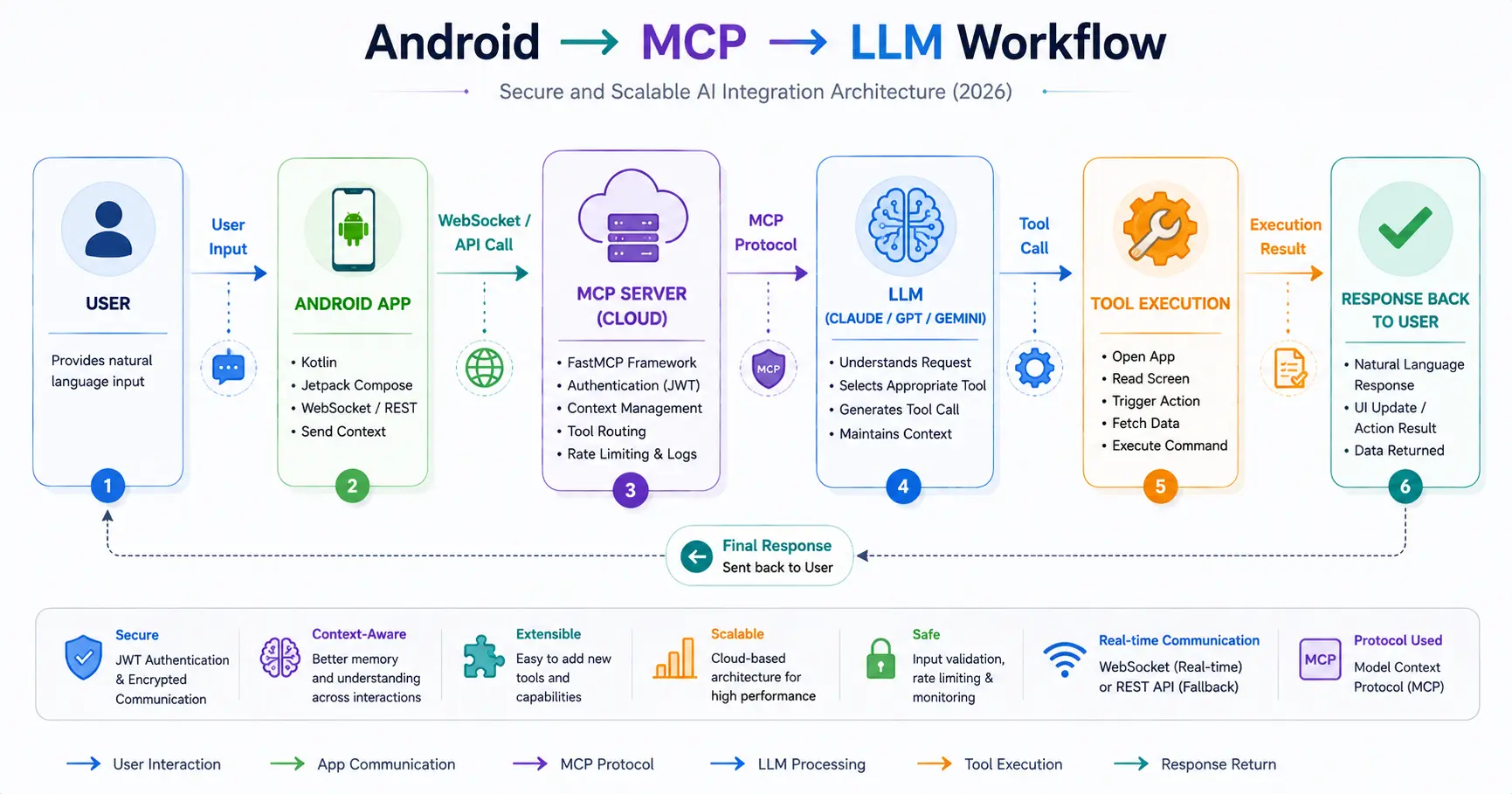
Step-by-Step Implementation
1. Setting Up MCP Server (Python + FastMCP)
FastMCP is a popular Python library that makes it easy to build MCP servers without manually handling protocol details.
Prerequisites
- Python 3.11+.
- uv or pip for dependency management.
- Basic familiarity with FastAPI helps (many FastMCP examples use it).
Install FastMCP
pip install fastmcp
# or using uv
uv pip install fastmcp
Create a Simple MCP Server
Create bluetooth_mcp_server.py:
from fastmcp import FastMCP

mcp = FastMCP(
    "Android Bluetooth Helper",
    dependencies=[],
)

@mcp.tool()
def open_bluetooth_settings(reason: str) -> dict:
    """
    Request that the client app opens Bluetooth settings.
    The server itself can't open settings on the phone, but
    it can instruct the client what to do.
    """
    # You can log or add simple business logic here
    return {
        "action": "OPEN_BLUETOOTH_SETTINGS",
        "reason": reason,
    }

@mcp.tool()
def diagnose_bluetooth_issue(symptoms: str) -> str:
    """
    Provide a human-readable explanation and basic steps
    for common Bluetooth issues.
    """
    # In a real MCP server, you would call an LLM here,
    # but we'll keep it simple for now.
    if "not visible" in symptoms.lower():
        return "Your device might not be in pairing mode. Try turning Bluetooth off and on, then enable visibility."
    return "Try toggling Bluetooth and checking if the device is in range."
This server exposes two tools:
- open_bluetooth_settings – returns a structured action.
- diagnose_bluetooth_issue – returns advice as text.
Run the MCP Server Locally
With FastMCP, you typically use a dev command to spin up an MCP inspector environment during development.
fastmcp dev bluetooth_mcp_server.py
This usually:
- Starts a proxy.
- Offers a local web inspector (often around http://localhost:5173) to test tools.
- Allows integration with desktops like Claude or other MCP clients.
For production, many setups use HTTP or FastAPI transports. Some reference projects combine FastMCP with FastAPI to expose MCP-compatible endpoints.
2. Connecting from Android App (Kotlin Code)
On Android, you’ll write your own minimal MCP client over HTTP instead of stdio/WebSocket, because mobile prefers HTTPS, you deploy the MCP server to Railway/Render and the Android app sends and receives JSON.
Define Data Models
In your Kotlin code (e.g. McpModels.kt):
data class McpToolRequest(
    val toolName: String,
    val arguments: Map<String, Any?>
)

data class McpToolResponse(
    val action: String?,
    val reason: String?,
    val message: String?
)
You can refine this based on your MCP response structure but this is enough for our Bluetooth example.
Use Retrofit to Call MCP Server
Add Retrofit dependencies in build.gradle:
implementation("com.squareup.retrofit2:retrofit:2.9.0")
implementation("com.squareup.retrofit2:converter-moshi:2.9.0")
implementation("com.squareup.moshi:moshi-kotlin:1.15.0")
Create an API interface:
import retrofit2.http.Body
import retrofit2.http.POST

interface McpApi {
    @POST("/tools/call")
    suspend fun callTool(
        @Body request: McpToolRequest
    ): McpToolResponse
}
In practice, your FastMCP + FastAPI server would need an endpoint like /tools/call that accepts toolName and arguments, invokes the corresponding MCP tool and returns JSON.
Many example repos show how to combine FastMCP with HTTP servers for production use.
Initialize Retrofit
import retrofit2.Retrofit
import retrofit2.converter.moshi.MoshiConverterFactory

object McpClient {
    private const val BASE_URL = "https://your-mcp-server-url.com"

    private val retrofit: Retrofit by lazy {
        Retrofit.Builder()
            .baseUrl(BASE_URL)
            .addConverterFactory(MoshiConverterFactory.create())
            .build()
    }

    val api: McpApi by lazy {
        retrofit.create(McpApi::class.java)
    }
}
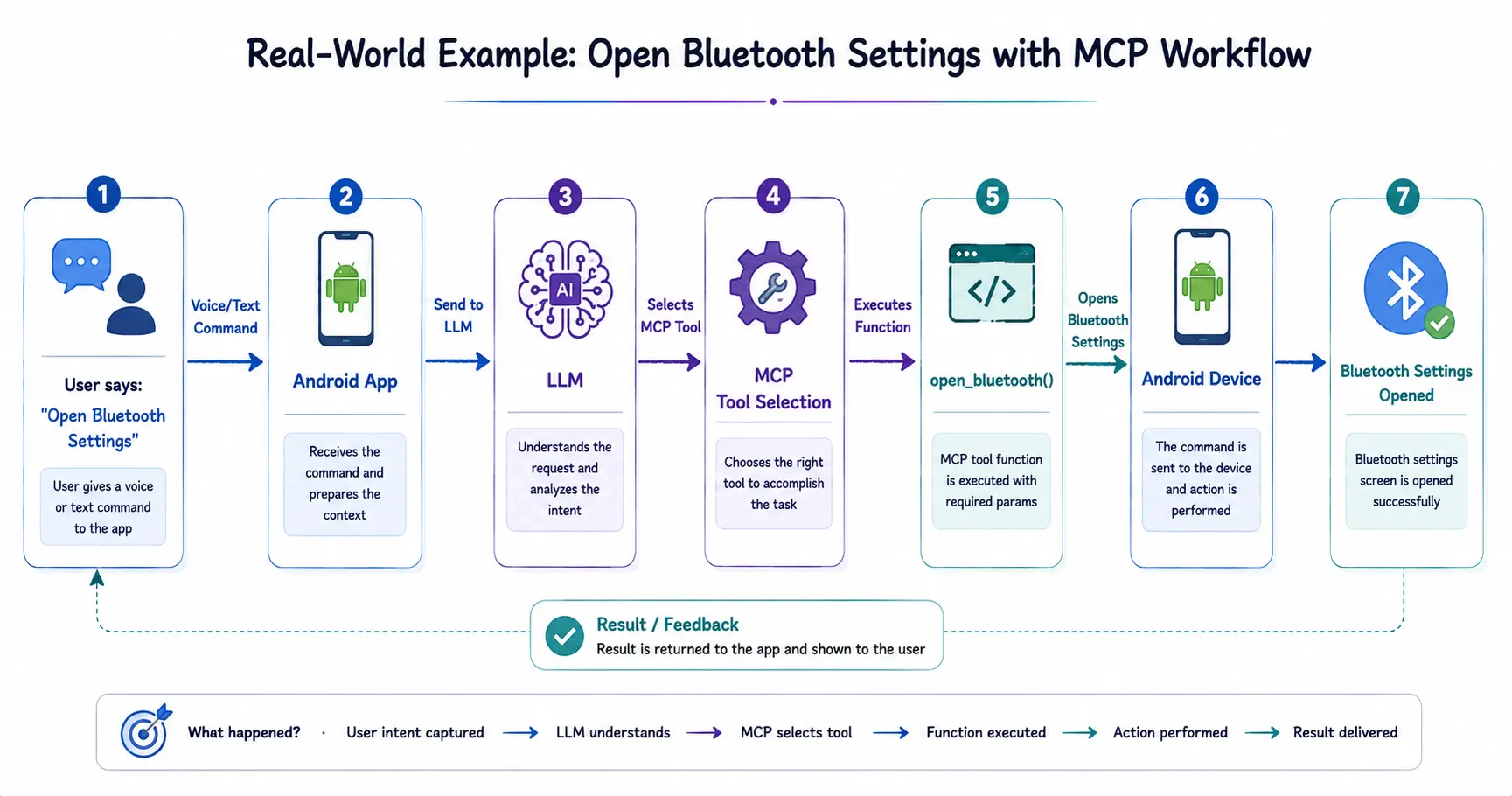
3. Real Example
Now let’s build the Android logic that sends a tool call to MCP open_bluetooth_settings , Receives an action, Consumes that action by opening Bluetooth settings.
ViewModel Logic
import androidx.lifecycle.ViewModel
import androidx.lifecycle.viewModelScope
import kotlinx.coroutines.launch

class BluetoothHelperViewModel : ViewModel() {

    fun requestOpenBluetoothSettings(onAction: (McpToolResponse) -> Unit) {
        viewModelScope.launch {
            try {
                val request = McpToolRequest(
                    toolName = "open_bluetooth_settings",
                    arguments = mapOf(
                        "reason" to "User tapped 'Fix Bluetooth' button in the app"
                    )
                )

                val response = McpClient.api.callTool(request)
                onAction(response)
            } catch (e: Exception) {
                // Handle error (network, parsing, etc.)
                onAction(
                    McpToolResponse(
                        action = null,
                        reason = null,
                        message = "Failed to connect to AI helper. Please try again."
                    )
                )
            }
        }
    }
}
Activity / Fragment: Opening Settings
import android.content.Intent
import android.provider.Settings
import android.widget.Toast
import androidx.activity.ComponentActivity
import androidx.lifecycle.ViewModelProvider

class BluetoothHelperActivity : ComponentActivity() {

    private lateinit var viewModel: BluetoothHelperViewModel

    override fun onStart() {
        super.onStart()
        viewModel = ViewModelProvider(this)[BluetoothHelperViewModel::class.java]

        // Example trigger: user taps a button
        // buttonFixBluetooth.setOnClickListener { onFixBluetoothClicked() }
    }

    private fun onFixBluetoothClicked() {
        viewModel.requestOpenBluetoothSettings { response ->
            if (response.action == "OPEN_BLUETOOTH_SETTINGS") {
                openBluetoothSettings()
            } else {
                Toast.makeText(
                    this,
                    response.message ?: "Could not get Bluetooth help.",
                    Toast.LENGTH_LONG
                ).show()
            }
        }
    }

    private fun openBluetoothSettings() {
        val intent = Intent(Settings.ACTION_BLUETOOTH_SETTINGS)
        startActivity(intent)
    }
}
Here MCP server returns the intention, android app translates intention into actual Intent and you remain in control and can add additional checks, UI confirmations or logging. This pattern can be reused for opening Wi-Fi settings, navigating to app-specific screens and triggering flows like start KYC or open payment screen.
4. Deployment Guide (Railway, Render, etc.)
To make your MCP server usable from Android devices across world, you’ll deploy it to a public HTTPS host. Many developers in 2025–2026 use platforms like Railway or Render to deploy Python + FastAPI-based MCP servers.
High-Level Steps (Railway Example)
- Create a GitHub repo
- Include
bluetooth_mcp_server.py. - Add
requirements.txtwithfastmcp,fastapi,uvicorn, etc.
- Include
- Create a FastAPI wrapper (if needed)
- Expose an HTTP endpoint that calls MCP tools internally.
- Connect GitHub to Railway
- Create a new project.
- Choose “Deploy from GitHub”.
- Select your repo.
- Configure environment
- Set Python version.
- Set start command (e.g.,
uvicorn main:app --host 0.0.0.0 --port 8000).
- Get the public URL
- Example:
https://android-mcp-helper.up.railway.app. - Use this URL in your Android
BASE_URL.
- Example:
Render and similar platforms follow very similar patterns: GitHub integration, environment setup, HTTP port, and auto-deploy on push.
Basic Table: Platforms Overview
| Platform | Strengths | Typical Use Case |
|---|---|---|
| Railway | Simple GitHub integration, generous free tier, good for prototypes | Early-stage MCP servers and side projects |
| Render | Stable, predictable pricing, strong Python support | Production-facing MCP APIs |
| Fly.io | Good for global deployment with regional presence | Latency-sensitive apps serving users across India |
Security Best Practices Of MCP
When connecting Android apps to AI-powered backends, especially via MCP, security must be treated as a first-class concern.
- Authentication & Authorization -
- Use JWT or OAuth2 between Android and MCP server.
- Never expose raw LLM API keys in the app; keep them on the MCP server.
- Associate tool calls with a user ID or session, so you can audit usage.
- Input Validation -
- Even though MCP tools are AI-triggered, treat all inputs as untrusted:
- Validate JSON structure.
- Limit lengths of strings.
- Sanitize anything passed into shell commands, SQL, or third-party APIs.
- Limited Tool Surface -
- Avoid giving the LLM a “god mode” API.
- Create small, focused tools like
open_bluetooth_settings,get_user_profile,create_support_ticket. - Avoid tools that can run arbitrary code or call arbitrary URLs unless strictly necessary.
- MCP’s explicit tool registration model makes it easier to audit which actions are possible.
- Logging and Monitoring -
- Log tool calls with timestamps, user IDs (or device IDs), and arguments.
- Use observability stacks or cloud logging.
- Watch for abnormal usage patterns (e.g., many tool calls in short time).
- In enterprise contexts, recent work on MCP emphasizes observability and tracing integration (OpenTelemetry, etc.), especially for complex agent workflows.
Future of MCP in Android Development
In 2026 MCP is moving rapidly from developer toy to enterprise-grade infrastructure with support from major cloud providers and AI platforms.
For Android developers this means expect more official MCP clients for Kotlin/Java, you may debug MCP workflows directly in Android Studio and cross-platform reuse: The same MCP server can serve web, iOS, desktop and Android clients. As AI agents become more capable, Android apps may shift from one-off chat screens to agent-first experiences where MCP orchestrates long-running workflows, Tools represent app features and LLMs become brains that coordinate actions instead of just replying with text.
Final Advice for Android Developers in 2026
Connecting your Android app directly to LLM APIs might work for your first prototype but MCP is what turns that prototype into a clean, maintainable, and scalable system.
By building a Python MCP server with FastMCP for tools like open_bluetooth_settings, wiring your Kotlin app to call these tools over HTTPS, deploying to platforms like Railway or Render and applying strong security practices, you create an architecture where your Android app stays in control, and the AI becomes a powerful, well-behaved collaborator instead of an unpredictable black box.
Share this publication
Frequently Asked Questions
Do I need to understand the full MCP spec to use it?
No. Libraries like FastMCP abstract most protocol details; you mainly define tools and wire HTTP endpoints.
Can I run MCP servers on-prem or on my own VPS?
Yes. MCP is transport-agnostic; you can host it on Railway, Render, or your own infrastructure, as long as your Android app can reach it over HTTPS.
Is MCP tied to any single LLM provider?
No. MCP is designed to be vendor-neutral; you can integrate OpenAI (like [GPT-5.6 Sol](/news/openai-gpt-5-6-is-now-optimizing-itself-cutting-costs-by-20)), Anthropic (like [Claude Opus 5](/news/claude-opus-5-released)), or other providers inside your server logic. See our list of the [Best 12 AI Coding Tools for Developers](/ai-tools/best-12-ai-coding-tools) for more details.
How is MCP different from simple REST APIs?
MCP adds structured tool definitions and AI-specific context, enabling LLMs to reason about tool usage and chain calls, whereas generic REST does not have that standardized “AI tool” layer.
Can MCP help with multilingual apps?
Yes. You can build tools that tailor responses or resources based on language preferences; the LLM handles language, while MCP tools handle business logic.
Is FastMCP production-ready for Android workloads?
FastMCP is used in multiple tutorials and projects focused on building MCP servers, and when paired with a robust HTTP stack like FastAPI plus good deployment practices, it can be used in production scenarios.
How do I version my MCP tools?
Use explicit versioning in tool names (e.g., diagnose_bluetooth_issue_v2) or maintain tool metadata carrying version information, then deprecate older tools gradually.
What about offline scenarios?
MCP itself relies on connectivity to your server, but you can combine local models for basic tasks with MCP for heavier cloud-based workflows.
Are there any enterprise-focused MCP features?
Recent work has emphasized stateless core, extensions, and observability integrations to make MCP suitable for enterprise governance and monitoring.
How does MCP fit into an existing microservices architecture?
You can treat your MCP server as a “gateway” that orchestrates calls to existing microservices and presents them as tools to the AI.